


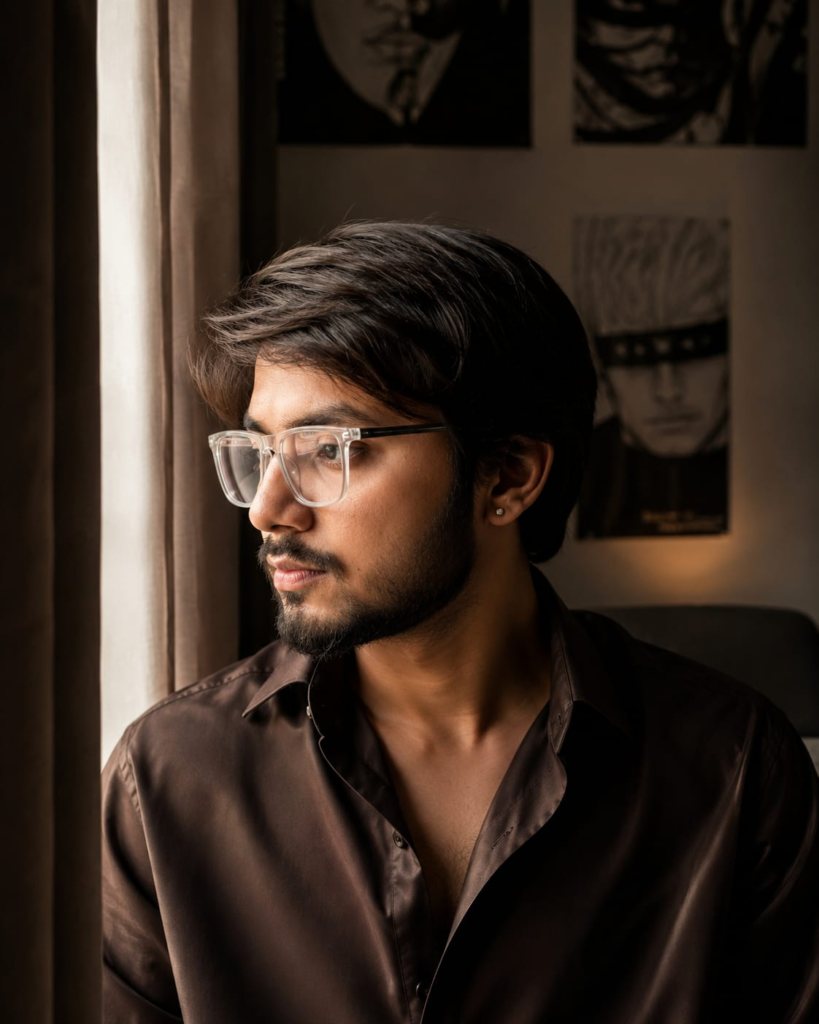
There are 80+ Image Prompts for creating stylish images using Google Gemini or ChatGPT. These Prompts are specially Image Prompts for Boys and Couples. These are the best AI prompts for images to create aesthetic AI images for yourself.
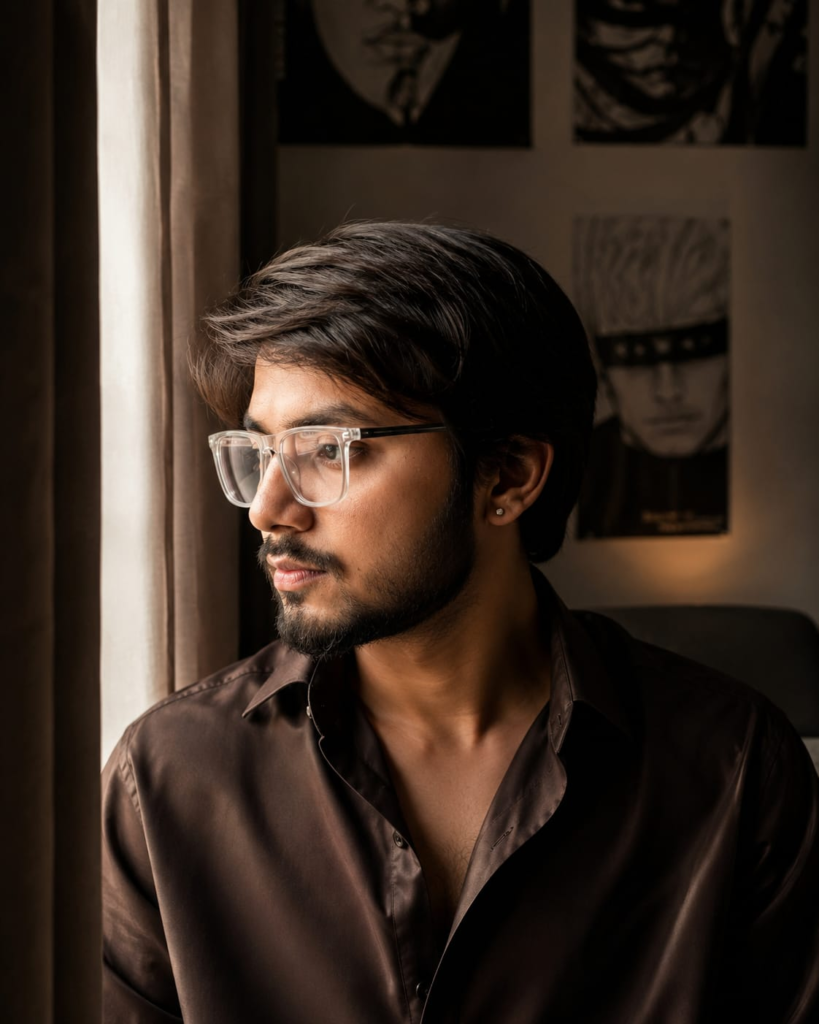
Prompt:-
Ultra-realistic cinematic portrait of a young man in side profile, looking thoughtfully towards a window, messy wavy black hair with natural volume, light stubble beard, sharp jawline, small silver stud earring, wearing a dark brown satin button-up shirt with the top buttons open. Soft natural window light illuminating one side of the face, warm moody color grading, cozy modern bedroom with anime posters on the wall in the background, blurred background (bokeh), shallow depth of field, highly detailed skin texture, realistic eyes, DSLR photography, 85mm lens, f/1.8, HDR, 8K, ultra photorealistic, premium fashion editorial, cinematic composition, subtle film grain, natural shadows, masterpiece, extremely detailed.
Negative Prompt:
low quality, blurry, cartoon, anime, CGI, oversaturated, overexposed, deformed face, extra ears, extra eyes, bad anatomy, duplicate, watermark, text, logo, noise, low resolution, plastic skin, unrealistic lighting, distorted proportions.

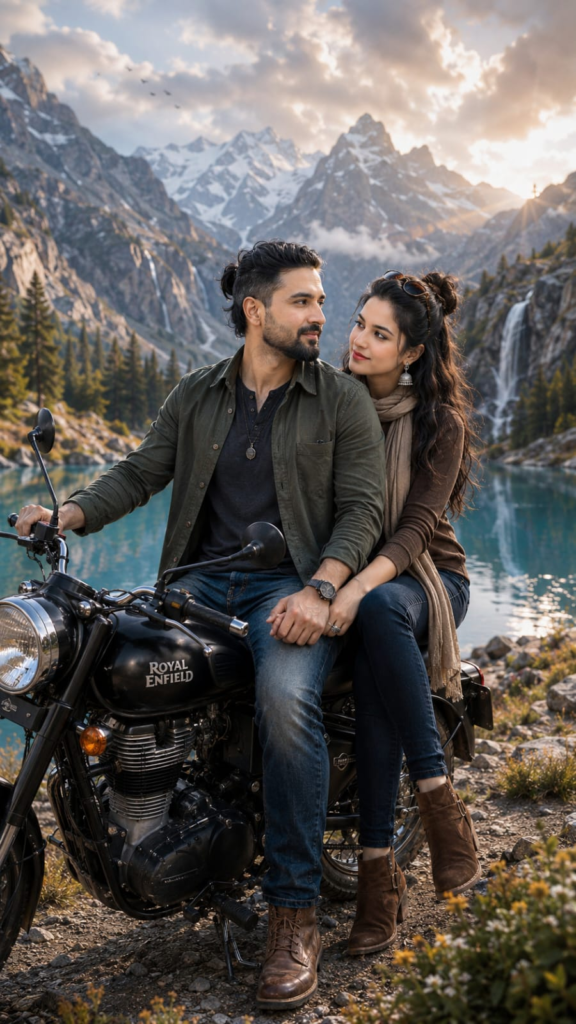
Prompt:-
🏔️❤️ 𝐒𝐚𝐟𝐚𝐫 𝐒𝐢𝐫𝐟 𝐌𝐚𝐧𝐳𝐢𝐥 𝐓𝐚𝐤 𝐍𝐚𝐡𝐢𝐧… 𝐄𝐤 𝐃𝐮𝐬𝐫𝐞 𝐊𝐞 𝐒𝐚𝐚𝐭𝐡 𝐓𝐚𝐲 𝐇𝐨𝐭𝐚 𝐇𝐚𝐢. ✨ CRITICAL FACE, BODY, SKIN & IDENTITY LOCK (Highest Priority): Use the uploaded male and female reference images as the ONLY identity references. Preserve 100% exact facial identity of both subjects including forehead, cheeks, jawline, eyebrows, eyelashes, nose, lips, ears, smile, expressions, hairstyle, body proportions and natural beauty marks. Preserve the exact eye shape while rendering naturally realistic deep sapphire-blue eyes with crystal-clear iris texture, authentic reflections, bright natural catchlights and naturally curled eyelashes. Generate both subjects as complete natural human bodies. The face, neck, shoulders, chest, arms, hands and every visible body part MUST have the EXACT SAME skin tone, undertone, melanin level, complexion, brightness, exposure, white balance, pore detail and lighting as their respective reference images. Absolutely ZERO face-body color mismatch. Preserve realistic pores, authentic HDR skin rendering, natural subsurface scattering and seamless skin continuity. Create an ultra-realistic Vogue × National Geographic × Royal Enfield travel editorial portrait of the same young South Asian couple enjoying a peaceful road-trip stop beside an untouched Himalayan alpine lake. Instead of a normal bike pose, capture a cinematic three-quarter side angle where the classic matte-black Royal Enfield Classic 350 is parked beside the crystal-clear lakeshore on a rugged mountain trail. The man sits comfortably on the motorcycle, one hand resting on the handlebar while the other gently holds the woman’s hand, looking toward the distant snow-covered peaks with a calm smile. The woman sits sideways behind him with one foot resting lightly on the ground, leaning affectionately against his shoulder while smiling naturally toward him instead of the camera, creating genuine chemistry and storytelling. The man wears a premium deep olive-green overshirt layered over a charcoal henley T-shirt, rugged denim jeans, vintage leather boots, a black cord pendant necklace and a luxury field watch. His naturally wavy jet-black hair is tied into a relaxed low bun with a neatly groomed beard. The woman wears an elegant deep coffee-brown fitted knit top layered with a beige wool travel scarf, dark indigo skinny jeans, suede ankle boots, handcrafted silver jhumka earrings, delicate silver rings and premium black sunglasses resting casually on her head. Her same uploaded butterfly-cut waist-length jet-black hair flows naturally in the cool mountain breeze with silky shine and soft face-framing strands. The environment features an emerald-blue glacial lake reflecting towering Himalayan mountains, golden alpine grass, wildflowers, scattered pine trees, dramatic cliffs, low floating clouds, distant waterfalls, migrating birds, cinematic mist, soft wind moving the clothing naturally, warm sunrise rays breaking through the clouds, volumetric light beams, floating dust particles and creamy optical bokeh, creating an emotional luxury adventure atmosphere. Captured on Canon EOS R5 Mark II, RF 85mm f/1.2L DS portrait lens, ISO 100, f/2.0, HDR, ultra-shallow depth of field, razor-sharp facial details, authentic clothing textures, realistic motorcycle reflections, premium Vogue × National Geographic × Land Rover Adventure cinematic color grading, 16K ultra-realistic quality, vertical 9:16, award-winning travel photography. Negative Prompt: watermark, logo, signature, text, face swap, different face, altered identity, face-body color mismatch, different skin tone, brighter face, darker body, mismatched neck, inconsistent lighting, inconsistent exposure, inconsistent white balance, beauty filter, plastic skin, blurry, low quality, CGI, anime, cartoon, bad anatomy, distorted face, extra fingers, duplicate limbs, cropped head, oversharpened, noise, artifacts.
Table of Contents
Image Prompts for Boys, Gemini, and the Best AI Prompts for Images: A Practical Guide That Actually Works
If you’ve spent any time typing random sentences into an AI image generator and getting back something that looks nothing like what you imagined, you already know the real secret isn’t the tool — it’s the prompt. I’ve been testing prompts across different AI models for months now, tweaking wording, swapping adjectives, and watching how small changes completely transform the output. What I’ve learned is simple: a good prompt is basically a set of instructions written the way you’d explain a photo to a professional photographer, not a wish you’re making to a genie.
This guide pulls together everything that’s actually worked for me — specifically around three areas people search for constantly: image prompts for boys, image prompts for Gemini, and the best AI prompts for images in general. Whether you’re a parent looking for a fun avatar for your son’s birthday invite, a content creator building a character library, or someone just trying to figure out how Gemini’s image generation behaves differently from other tools, this article walks through it all in plain language.
Why Most AI Image Prompts Fail
Before jumping into the prompt lists, it helps to understand why so many prompts fall flat. Most people type something like “a cool boy” or “anime character” and expect magic. The AI has no idea what “cool” means to you. It has no context for age, clothing, background, lighting, or mood unless you tell it.
The models that power tools like Gemini, Midjourney, and DALL-E are trained to interpret patterns of language, not read your mind. So the more specific and structured your prompt, the more consistent and usable your results will be. Think of a prompt as having layers: subject, appearance, action, setting, style, and mood. Once you start writing prompts with those layers in mind, everything changes.
Image Prompts for Boys: Getting Realistic and Creative Results
A lot of the searches around “image prompts for boys” come from parents, teachers, illustrators, and small business owners creating content for kids’ books, birthday cards, YouTube thumbnails, or even AI-generated avatars for gaming profiles. The challenge is that boy-focused prompts often come out either too generic or oddly stylized if you don’t add enough detail.
Here’s what actually works, based on real trial and error:
For realistic portraits: “A young boy around 8 years old, short brown hair, wearing a blue hoodie, smiling naturally, standing in a sunny park with autumn leaves in the background, soft natural lighting, photorealistic style, shallow depth of field.”
For cartoon or animated style: “A cheerful cartoon boy character, spiky black hair, wearing a red t-shirt and sneakers, standing with hands on hips in a superhero pose, bright flat colors, Pixar-style 3D rendering, clean background.”
For fantasy or adventure themes: “A young boy adventurer wearing a leather satchel and explorer boots, holding a wooden compass, standing at the edge of a mystical forest, golden hour lighting, cinematic fantasy illustration style.”
For sports or action shots: “A teenage boy mid-jump while playing basketball, dynamic motion blur, stadium lights in the background, dramatic angle from below, high-energy sports photography style.”
For birthday or greeting card use: “A happy young boy blowing out candles on a birthday cake, colorful balloons around him, warm indoor lighting, joyful expression, illustrated greeting card style.”
Notice the pattern in all of these — age range, clothing, pose, setting, lighting, and art style are all specified. That’s the formula. Skip any one of those and the AI fills in the blanks with something generic.
One thing worth mentioning from experience: if you’re generating images of children for public use — book covers, social content, ad creatives — always keep the descriptions family-appropriate and avoid anything that could be misread as inappropriate, even accidentally. Most AI platforms already have safety filters here, but it’s good practice regardless.
Image with Prompt:

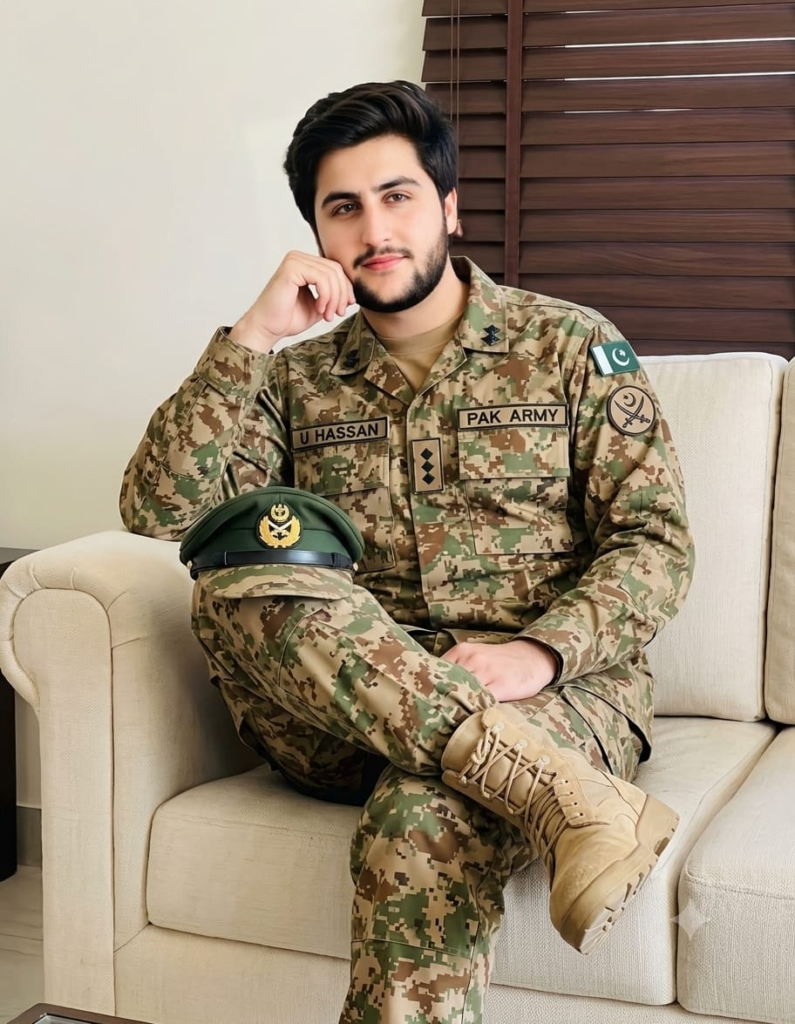
Prompt
A Pakistan Army officer sitting casually on a cream sofa in his digital camouflage uniform. He has a resting his chin on his hand with an elbow on the armrest, legs crossed. Wears tan combat boots. Name tape “U Hassan” and “PAK ARMY” on chest, Army Cap,captain rank insignia and Pakistan flag patch on sleeves. Background is a modern living room with dark wooden blinds and light walls. Relaxed, confident, patriotic portrait aesthetic, photorealistic, 8k.

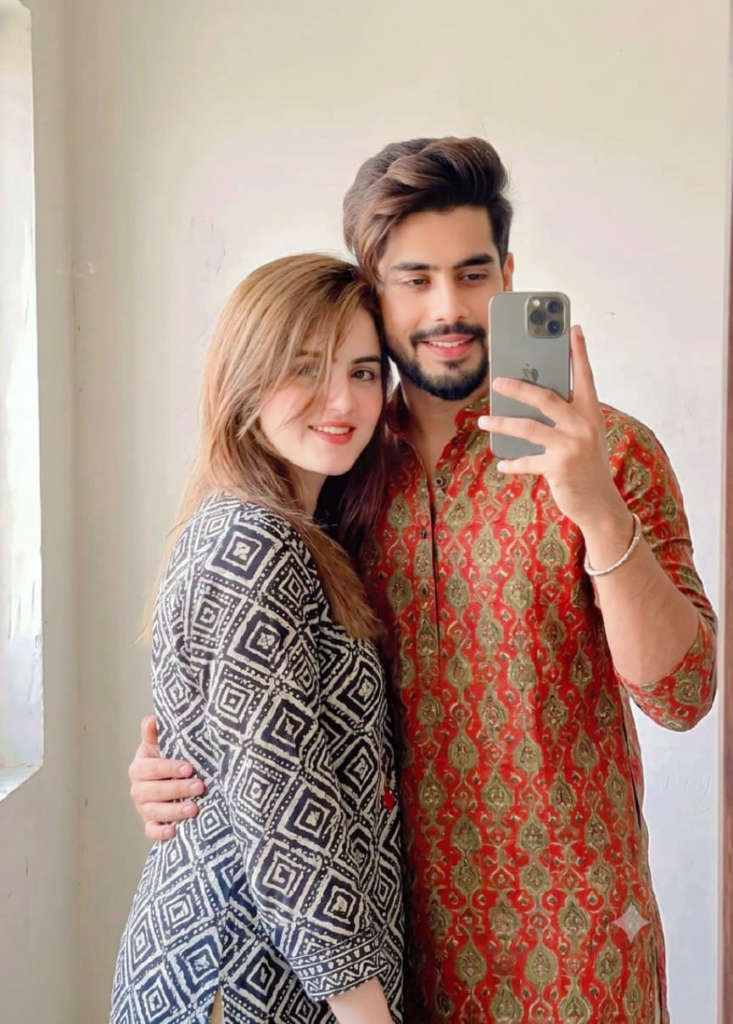
Prompt
Use our 100% facial and body structure to create a romantic Indian couple, (use refrence a image) Ultra -realistic a selfie portrait of couples in front of a plain or softly-lit background. Hold your phone in one hand so it’s visible in the mirror, showing your wristwatch or bracelet clearly man is wearing a olive Red And woman is wearing a black white, and make sure your face is partially covered by your hair for a casually stylish look.boy one hand holding girl back.
Image Prompts for Gemini: What Makes It Different
Gemini handles prompts a bit differently than some of the other major AI image tools. It tends to respond really well to conversational, descriptive language rather than a stacked list of keywords. Where older tools like Midjourney reward tight, comma-separated tags, Gemini often produces better results when you write more like you’re describing a scene to a friend.
Here’s what I’ve noticed works particularly well with Gemini:
Conversational scene-building: Instead of “boy, park, sunny, realistic,” try: “Show me a young boy playing in a sunny park on a warm afternoon, with golden light filtering through the trees behind him.”
Iterative refinement: Gemini tends to respond well to follow-up instructions. Start broad, then refine. For example, start with “Generate an image of a futuristic city at sunset,” then follow up with “Now add flying cars and make the buildings taller with neon signs.”
Style references within natural sentences: Instead of tagging “watercolor style” at the end, try weaving it into the sentence: “Paint this scene in a soft watercolor style with visible brush strokes and muted pastel tones.”
Specific emotional tone: Gemini seems to pick up on mood descriptors well. Adding phrases like “make it feel nostalgic and warm” or “give it a mysterious, moody atmosphere” often shifts the lighting and color grading noticeably.
A few practical Gemini-specific prompts that consistently deliver solid results:
- “Create a photorealistic image of a golden retriever puppy sitting on a wooden porch during a rainy afternoon, with warm light coming from a window behind it.”
- “Generate a minimalist flat-design illustration of a coffee shop interior, using a limited color palette of browns, creams, and soft greens.”
- “Design a sleek, modern logo concept for a tech startup, using geometric shapes and a blue-to-purple gradient, on a white background.”
The key difference to remember: Gemini rewards natural language and context, not just keyword stacking. Treat it like you’re briefing a designer, not typing search terms.
The Best AI Prompts for Images: A Universal Framework
Regardless of which platform you’re using, there’s a structure that consistently produces better results. I call it the six-layer prompt, and it works across Gemini, Midjourney, DALL-E, and most other generators.
1. Subject — Who or what is the main focus? Be specific about age, gender, species, or object type.
2. Appearance — What do they look like? Hair, clothing, colors, distinguishing features.
3. Action or pose — What are they doing? Standing, running, sitting, interacting with something.
4. Setting — Where is this happening? Indoor, outdoor, time of day, background elements.
5. Style — Photorealistic, cartoon, watercolor, 3D render, oil painting, anime, etc.
6. Mood and lighting — Warm, cold, dramatic, soft, cinematic, golden hour, moody shadows.
Here’s an example that ties all six layers together:
“A middle-aged woman [subject] with curly gray hair and wearing a green wool sweater [appearance], sitting at a wooden table reading a book [action], inside a cozy cabin with a fireplace in the background [setting], oil painting style [style], warm and peaceful evening lighting [mood].”
That single sentence, built layer by layer, will almost always outperform a vague one-liner. This framework is honestly the closest thing to a universal cheat code across every AI image tool I’ve tested.
Extra Tips That Make a Real Difference
A few smaller details that don’t get talked about enough but genuinely improve output quality:
- Camera and lens language works surprisingly well for photorealistic images. Phrases like “shot on a 50mm lens,” “shallow depth of field,” or “DSLR photography” push the AI toward more realistic textures and lighting.
- Negative prompting (telling the AI what to avoid) isn’t supported everywhere, but where it is, use it. “No text, no watermark, no extra limbs” can clean up a lot of common AI mistakes.
- Aspect ratio matters for how the composition turns out. A square image forces a tighter, more centered composition; a wide aspect ratio naturally invites more background and environmental storytelling.
- Batch testing beats single attempts. Generate three or four variations of the same prompt before deciding it’s not working. AI output has natural randomness, and sometimes the second or third try nails it.
- Reference real art movements or photographers’ styles when you want a distinct look — “in the style of a National Geographic wildlife photo” or “reminiscent of 1980s film photography” gives the model a clear stylistic anchor.
Common Mistakes People Make With Image Prompts
Even with a good framework, there are recurring mistakes that quietly ruin results:
Overloading the prompt. Cramming ten adjectives into one sentence often confuses the model rather than helping it. Pick the three or four details that matter most.
Forgetting the art style entirely. Without specifying a style, most tools default to a generic semi-realistic look that rarely matches what you had in mind.
Ignoring lighting. Lighting changes everything about how an image feels. A boy standing in “harsh midday sun” looks completely different from the same boy in “soft evening light.”
Not iterating. Treating the first output as final. The best results usually come after two or three rounds of small adjustments — different lighting, a tweak to pose, a change in background.
Copy-pasting prompts from lists without adjusting them. Generic prompt lists floating around the internet are a decent starting point, but the moment you add your own specific details — a particular hair color, a distinct setting, an emotional tone — the results improve dramatically.
Putting It All Together
Whether you’re generating image prompts for boys for a children’s book, testing out Gemini’s more conversational prompt style, or just trying to build a personal library of the best AI prompts for images, the underlying principle stays the same: specificity beats vagueness every time. Treat your prompt like a briefing document, not a wish. Describe the subject, the appearance, the action, the setting, the style, and the mood, and you’ll consistently get results that actually match what’s in your head.
AI image generation has gotten remarkably good over the past couple of years, but it still can’t read minds. The tools are only as good as the instructions you give them. Spend a little extra time crafting your prompt, run a few test variations, and you’ll notice the gap between “okay, that’s kind of what I wanted” and “wow, that’s exactly it” shrinks fast.
If there’s one habit worth building from all of this, it’s keeping a personal prompt journal — jot down what worked, what didn’t, and why. Over time, you’ll develop your own shorthand and style cues that consistently deliver the images you’re after, no matter which AI platform you’re using.